
Do you also want the blue tick badge after your username on Instagram? You are not the only one who want the blue tick verification on their Instagram account, as blue tick on Instagram is not just a symbol, but converys that your account is verified and authentic.
The tick on your account helps in bluilding trust and staying stand out among other, this is the reason why celebrities, influencers, brands, and public figures often gets their account verified. Instagram allows anyone to apply for the blue tick directly from the Instagram app.
In this article, I’ll show you how to get Instagram blue tick verification on your Instagram account with a simple, step-by-step guide
Why Get Verified on Instagram?
The main reason to get verified on Instagram is to build trust among your audeince as users tends to enagage more with verified accounts as compared to the ones that are not verified. In addition to this, verification boosts your credibility and visibility to reach out wider audience, proving your official presence to the users. The best thing about being verified is that, your fake accounts would be less likely used which makes your profile appears more trustworthy to followers, fans, and potential business partners.
How to Apply for Blue Tick Verification on Instagram
The steps to apply for the blue tick verification is simple and easy, just follow the steps mentioned below to get your account verified.
Step 1: Open the Instagram app on your device.
Step 2: Tap on your profile picture (profile icon) to go to your profile.
Step 3: Tap the three horizontal lines (menu) at the top right.
Step 4: Go to Account type and tools or scroll down to Business tools and controls/ Creator tools and controls.
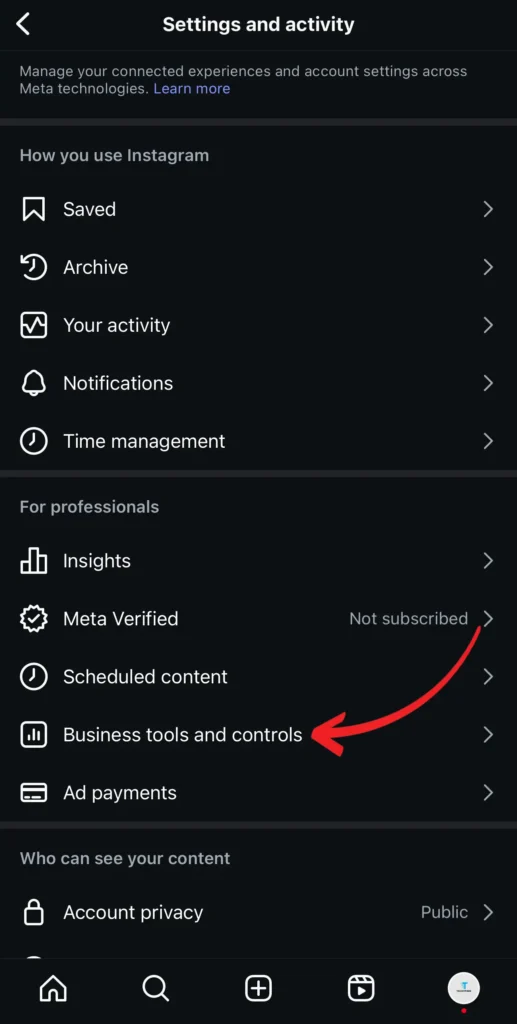
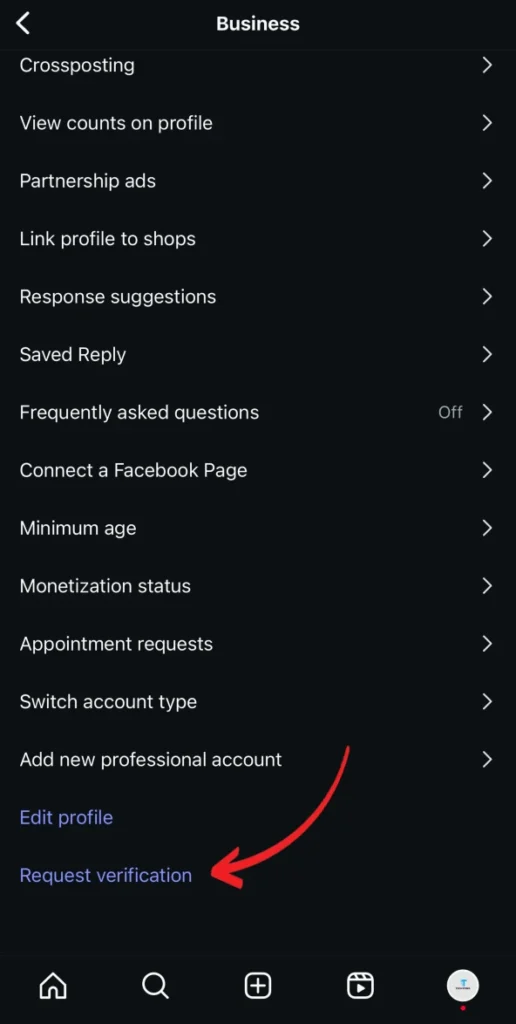
Step 5: Tap Request verification.
Step 6: Fill out the form with the required details such as full name and professional information.
Step 7: Upload a valid ID document (like a passport, driver’s license) for verification.
Step 8: Tap on Submit and wait for Instagram to review your verification request.
You will be notified by Instagram in your activity tab once your request is approved or denied by the verification team.
How Long Does Instagram Verification Take?
It usually takes a few days to a couple of weeks for Instagram to the review process for Instagram verification. Instagram checks your application, ID document, and account details to confirm your authenticity during this period. If your account is approved for verification you would be notified in the activity tab, however if it is denied, you can reapply after 30 days. So, you shouldn’t be demotivated even if your application is denied.
You can get the verification badge on your account by following these simple steps. If your account is not appoved on the first try, you shouldn’t be discouraged as you can reapply for the same and get the verification on your account.