

Have you ever wondered why Instagram shows you some very random things? Like funny cats, cooking tricks, or sports videos you never asked for? Now, Instagram has a new feature called “Your Algorithm” that lets you see what the app thinks you like.
The best part? You can also share your algorithm on your story. It’s fun to show your friends what Instagram believes about you. Sometimes it’s correct and sometimes it’s totally wrong.
In this guide, I will show you how to find “Your Algorithm” and how to post it on your story step by step. Let’s check what Instagram really knows about us!
How to Check Your Algorithm on Instagram
Before we start, here’s something important to know. Instagram’s CEO said, “We’re starting to publicly test the ability to see and control your algorithm to a small percentage of users in the US this week.” So if you can’t find this feature on your phone yet, don’t worry – it may take some time to reach everyone.
If you’re from the US, let’s see how to find Your Algorithm:
Step 1: Open Instagram and go to the Reels tab.
Step 2: Look at the top right corner – you will see a small settings icon.
Step 3: Tap that icon, and you will find a section called Your Algorithm.
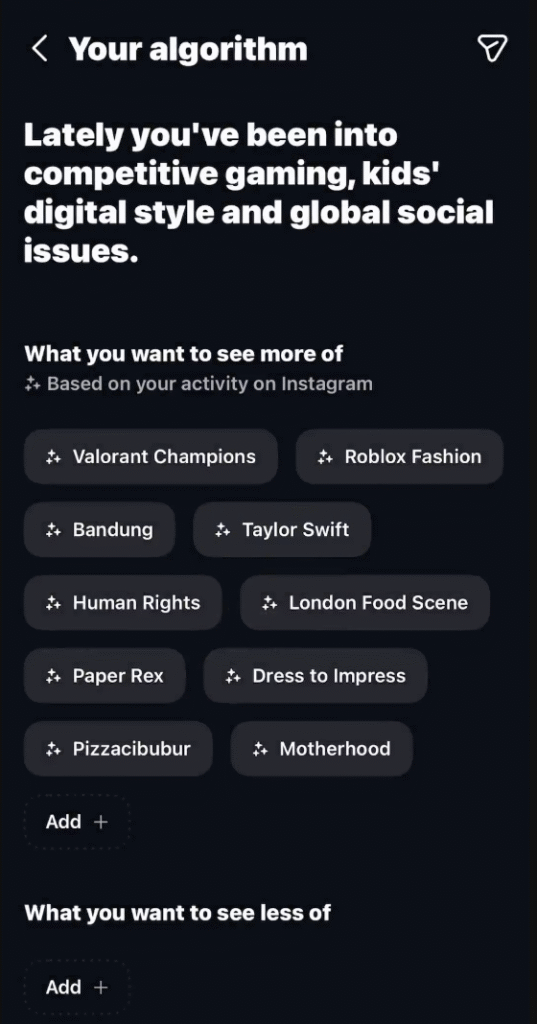
Here, Instagram will show a short line explaining what you have been interested in recently. For example, it might say something like: “You’ve been into competitive gaming, kids’ digital style, and global social issues.”
Below that, you will see two sections — What you want to see more of and What you want to see less of. These are based on what you watch and interact with on Instagram.
Each topic appears in a small rounded box, such as gaming, Taylor Swift, food, fashion, or social issues. These topics help Instagram understand your tastes and what you enjoy seeing.
You can also tap the Add button to include new interests or remove the ones you don’t like anymore. This allows Instagram to adjust your feed and show you more of the content you actually want.
How to Share “Your Algorithm” to Your Story
If you find your algorithm interesting or funny (and trust me, most people do), you can easily share it with your followers. Instagram has already made a Share button right on the page.
Here’s how to do it:
Step 1: On the Your Algorithm page, look at the top right corner – you will see a share icon (see the screenshot above).
Step 2: Tap that icon.
Right away, Instagram will take you to the Story editor. The screen will show your algorithm summary at the top with the headline “Your Algorithm” and the text below that says something like:
“You’ve been into competitive gaming, kids’ digital style, and global social issues.”
Now you can customize your story however you like – add stickers, GIFs, text, change background color, or even tag a friend to laugh with you. When you are ready, just hit Your story in the bottom left to post it.
It’s a fun way to let your friends see what Instagram believes you’re obsessed with – even if you’re not ready to admit it yet.